Graph RAG in Customer Service - beyond the buzz (Part 2: Graph Traversal)
In Graph RAG Part 1 article, I have shown about what graph community summaries in Graph RAG can give us . To recap, they provide a few useful features:
They normalize entity names: Instead of e.g. “scaling”, “scaled recipes”, “Scaling”, and other similar forms, they tend to stick to detected entity name “Scaling” in all summaries.
They describe facts in a standardized form and vocabulary: Mostly, the sentence format follows the structure “X does/is/{another verb} Y.
They gather knowledge from related nodes and thus enable a bit of "fanning out" and looking for extra information: Thanks to the Community Summaries which often gather multiple interconnected entities in the same summary, it is possible to detect that the app Cookidoo can indeed provide Scaled recipes, but also provides dedicated recipes to specific Thermomix models.
Now it's time for exploring graph traversal, which is employed in the Search part of Graph RAG.
Graph traversal is the act of moving through the graph via existing edges, which connect the nodes. In Graph RAG, it is used in one of the possible models of search, called Local Search.
How does Local Search work?
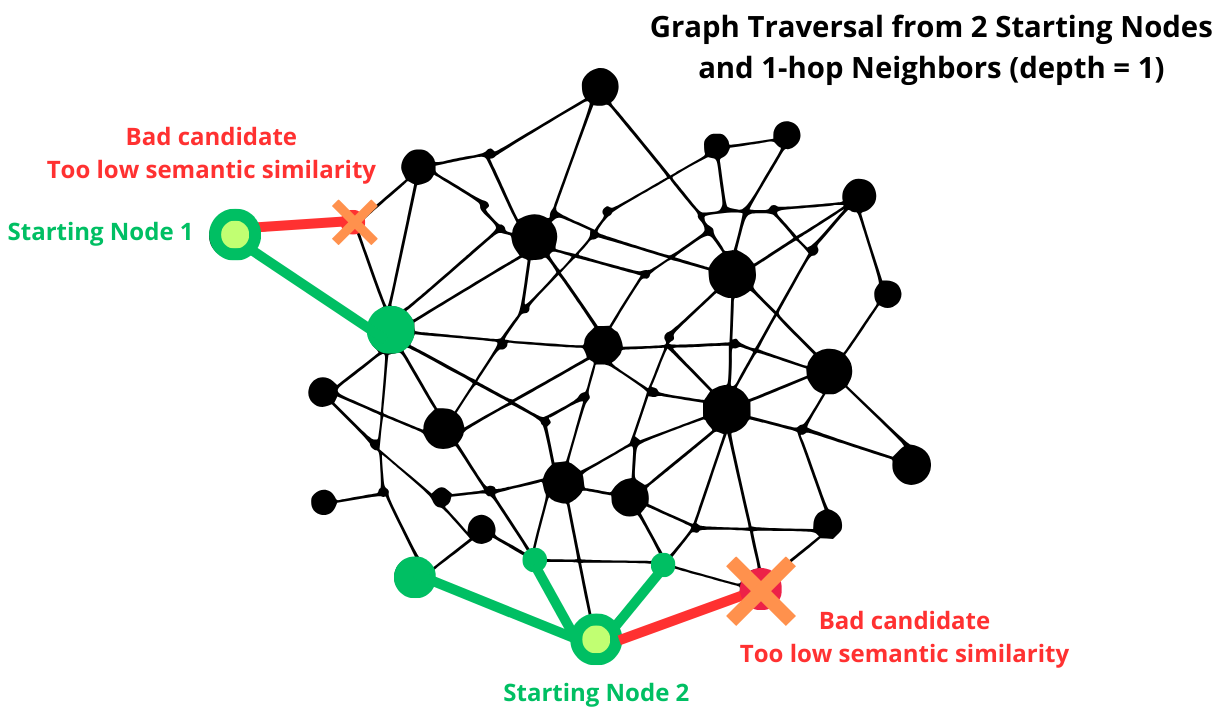
Step 1: Query Embedding & Initial Node Retrieval:
Convert the input query into an embedding vector.
Perform a vector similarity search (e.g., cosine similarity) to find the most relevant starting nodes in the graph.
Step 2: Graph Traversal:
Once a relevant node is found, explore its connected neighbors within a predefined depth.
This helps retrieve related facts, entities, or concepts without searching the entire graph.
Step 3: Contextual Filtering:
Not all neighboring nodes are useful. There are various ways to check the value of a node:
Relevance scoring (e.g., embedding similarity, semantic similarity).
Edge weight filtering (if graph has weighted edges).
Node importance ranking (e.g., PageRank, centrality).
Step 4: Subgraphs as contexts for RAG:
The retrieved nodes and edges form a subgraph that contains the most relevant information.
This subgraph is converted into a textual context for the LLM.
What does this give us?
In Part 1, I used a small database of Thermomix manuals. Let's stick to it now.
Let's also stick to the query: "Why can't I use scaling?"
FYI and Reminder (this will be important for understanding our experiments): Scaling in Thermomix refers to the new feature in Cookidoo that allows users to adjust recipe serving sizes to
...This excerpt is provided for preview purposes. Full article content is available on the original publication.