Best GPUs Under $1,500 for AI: Should You Upgrade?
Deep Dives
Explore related topics with these Wikipedia articles, rewritten for enjoyable reading:
-
Graphics processing unit
15 min read
While readers know GPUs exist, the Wikipedia article covers the fascinating history from early video display controllers through NVIDIA's invention of the GPU term in 1999, the architectural evolution that made them suitable for parallel computing beyond graphics, and the technical reasons why GPU memory bandwidth became critical for AI workloads
-
CUDA
12 min read
The article benchmarks NVIDIA GPUs and mentions 'kernel implementations' without explaining why NVIDIA dominates AI computing. The CUDA Wikipedia article explains the parallel computing platform's history, how it transformed GPUs into general-purpose processors, and why software ecosystem lock-in has maintained NVIDIA's AI hardware monopoly despite AMD alternatives
We often see inference throughput and fine-tuning stats for consumer GPUs, but they mostly focus on the high end (RTX 4090/5090). What about more affordable cards: are they simply too slow, or too memory-constrained to run and fine-tune LLMs?
To find out, I benchmarked GPUs across the last three NVIDIA RTX generations: 3080 Ti, 3090, 4070 Ti, 4080 Super, 4090, 5080, and 5090. With the exception of the xx90 cards, these GPUs offer only 12–16 GB of VRAM.
Using vLLM, I measured throughput when the model fully fits in GPU memory and when part of it must be offloaded to system RAM. For fine-tuning, I evaluated both LoRA and QLoRA on 1.7B and 8B LLMs.
Benchmark code and logs:
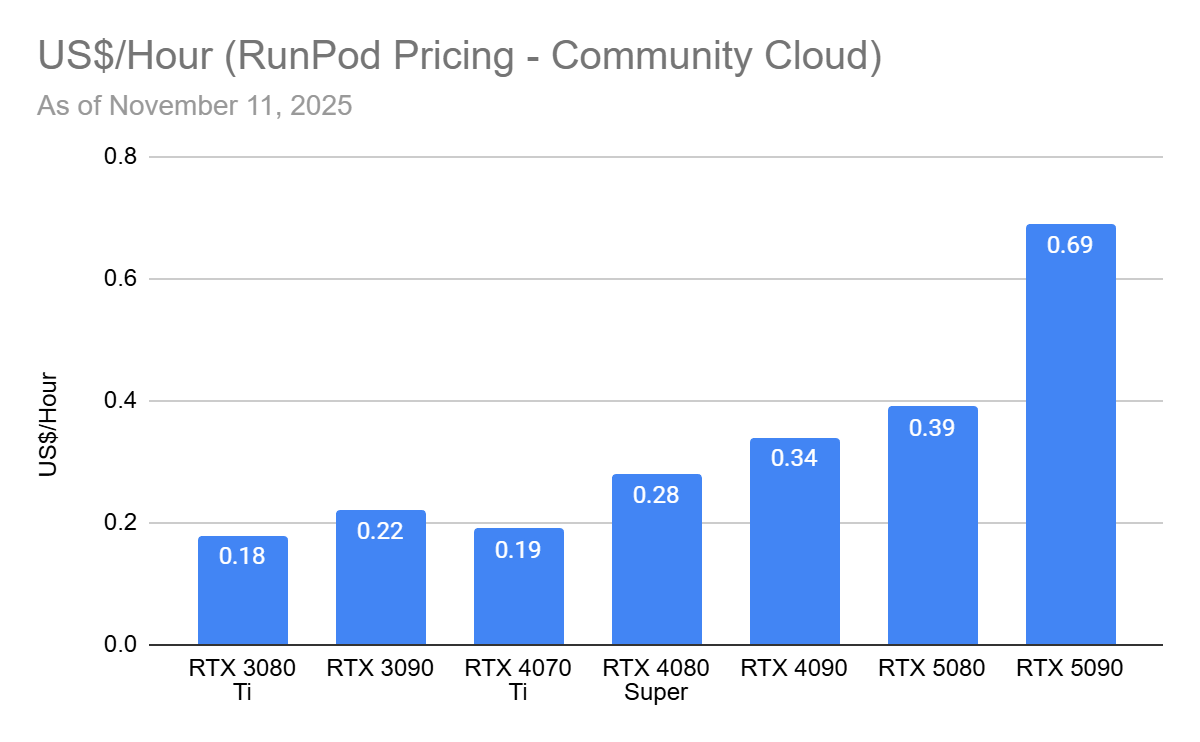
I used GPUs from RunPod (referral link) and also report cost-efficiency based on their pricing.
Running LLMs without High-End GPUs
To benchmark GPUs for inference throughput, use the same stack you plan to deploy. It sounds obvious, but many popular (often marketing-driven) benchmarks don’t resemble real inference frameworks, so their numbers are speeds you’ll never hit in your use case. If you run Ollama, benchmark with Ollama and GGUF models. If you use vanilla Hugging Face Transformers, benchmark with Transformers directly.
Different libraries ship different kernel implementations, each optimized to varying degrees for specific GPU generations.
This excerpt is provided for preview purposes. Full article content is available on the original publication.